

默认情况下, Kali 系统的语言是英文的,如果你需要将Kali系统设置为中文语言,那么可以通过下方步骤来实现:
1、打开终端,更新系统包列表:
sudo apt-update
sudo apt-upgrade
2、安装中文语言包:
sudo apt-get install locales
3、生成中文语言环境(以zh_CN.UTF-8为例):
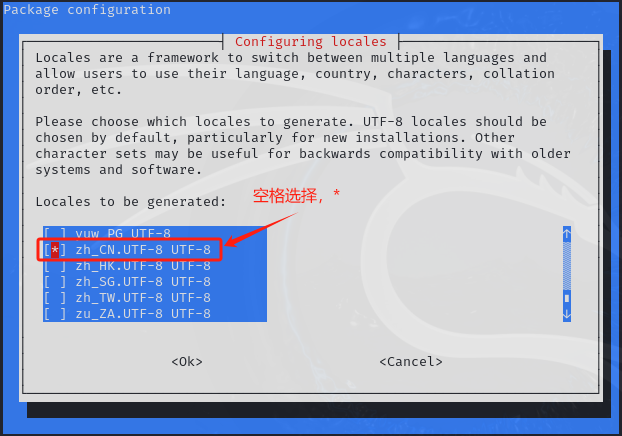
sudo dpkg-reconfigure locales
在出现的界面中,选择 zh_CN.UTF-8,通常通过空格选择。
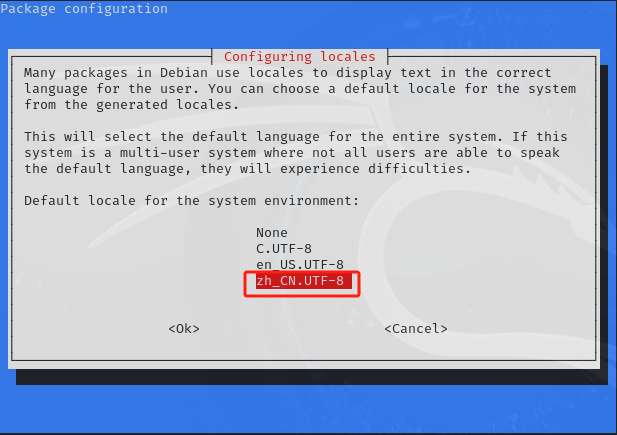
确认后,在出现的界面中可以看到 zh_CN.UTF-8,右键选中OK,确认,如下图。
4、更新系统区域设置:
sudo locale-gen zh_CN.UTF-8
5、应用中文设置:
sudo update-locale LANG=zh_CN.UTF-8
6、重新登录或重启Kali Linux,以使配置生效。
暂无评论...
